

I also have a 2-year-old phone. There was a time when WhatsApp took 10 seconds to open, the phone used to hang as soon as I opened the camera, and I thought now I would have to buy a new phone. If you are also facing similar issues, you can follow our guide on How To See Deleted WhatsApp Messages to learn simple ways to check deleted messages without unnecessary apps.
But the truth is, if your mobile has become slow, what to do – the answer is not to buy a new phone. I tried these 7 hacks on my own phone, and my phone started working like new again.
If your phone is also hanging, apps are opening late, then this article is for you. Today I will tell you how to make your phone fast without spending any money and without downloading any cleaner app.
Why Does Phone Become Slow? First Understand This
Until you know the reason, the solution will not work. There are 4 main reasons why a phone becomes slow. If you also want to make your WhatsApp experience easier, check out our guide on 7 WhatsApp Tricks to discover some useful features and shortcuts.
1. Storage Becomes Full: When more than 80% of the phone’s storage gets filled, the processor does not get space to breathe.
2. Background Apps: We close the app, but they keep running behind and keep eating RAM.
3. Cache Accumulation: Every app collects its garbage, which slowly grows into GBs.
4. Never Restarting: The phone stays ON for months, so the system gets tired.
Now let’s see the mobile hang problem solution step-by-step.
1. How To Clear Cache – First And Easiest Hack
First of all, you need to understand how to clear cache, because this 2-minute work will make your phone 30% faster.
Cache means temporary data of the app. Like you see something daily in Chrome, it saves photos-videos so that next time it opens quickly. But when this becomes too much, it makes the phone slow instead.
Step-by-Step – Do It Like This:
Step 1: Open Settings of your phone.
Step 2: Scroll down and click on Apps.
Step 3: Now choose the heaviest app, like Chrome, YouTube, Facebook.
Step 4: Click on it and go to Storage.
Step 5: There you will see Clear Cache, click on it.
Keep In Mind: Never click on Clear Data by mistake. Clear Cache will not delete your login, photos, anything. Only garbage will be cleaned.
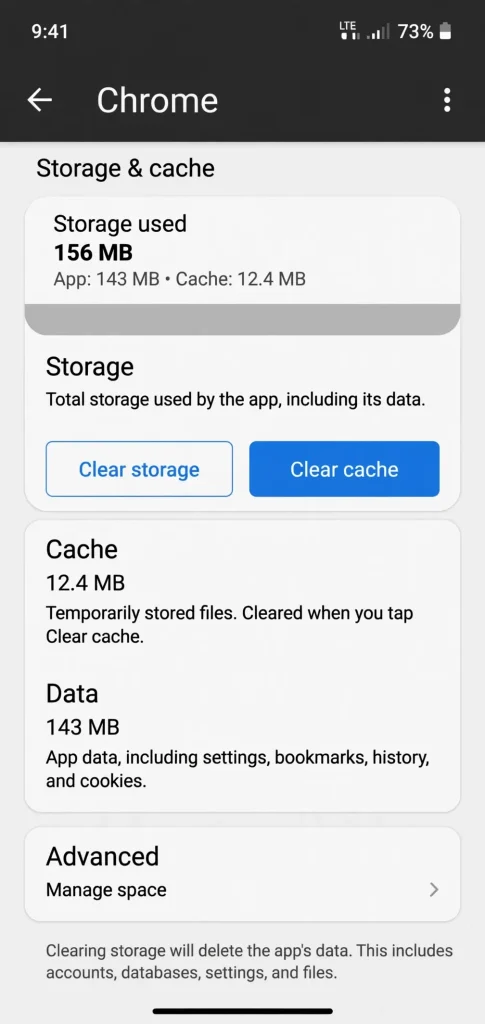
_Image 1: Settings > Apps > Chrome > Storage > Clear Cache – Just click on this button, not on Clear Data._
Do this work once a week with all heavy apps. You will see the difference yourself.
2. Close Background Apps – Let RAM Breathe
We often open 15-20 apps and leave them. You think they are closed, but they are eating RAM in the background.
Do It Like This:
Press the Recent Apps button (the square button below). Swipe up the apps you are not using right now to close them.
And do one more thing – Settings > Apps > App you have not used for 2 months > Battery > Restrict Background. With this, that app will not run from behind at all.
3. Make Phone Fast With Developer Options – Secret Trick Nobody Tells
This hack is my favourite. With this, the phone really starts feeling 2x faster. People call this the trick to make phone fast with developer options.
In this, we will reduce the animation of the phone. Animation means when you open an app, it opens in a slight slow motion, we will make it fast.
Step-by-Step – Do It Calmly, There Is No Risk:
Step 1: Go to Settings > Click on About Phone.
Step 2: There will be Build Number written, tap 7 times continuously on it. It will say – “You are now a developer”. Don’t be scared, this is normal.
Step 3: Come back to Settings, below you will see Developer Options, open it.
Step 4: Scroll down, you will see 3 options:
- Window Animation Scale
- Transition Animation Scale
- Animator Duration Scale
Change all three from 1x to 0.5x.
That’s it! Now open the app, you will feel as if the phone has got wings.
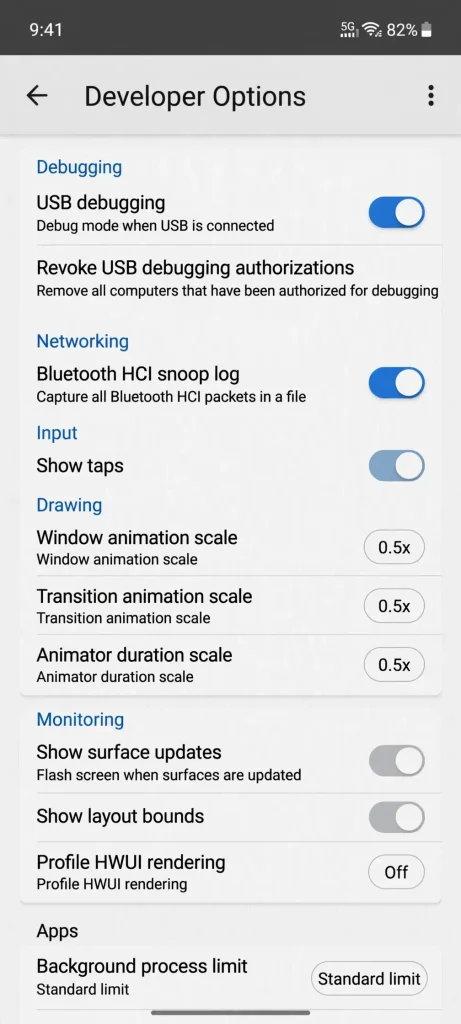
_Image 2: In Developer Options, change all three Animation Scales to 0.5x. Phone will feel fast instantly._
4. Keep Storage Empty – Remember The 20% Rule
How to increase phone speed – its biggest answer is storage.
Remember one rule – Always keep 20% storage empty. Means if the phone is 128GB, then at least 25GB should be empty.
How To Empty:
Go to Settings > Storage. See what is taking up the most space. Often WhatsApp videos, duplicate photos, and old downloads are the ones.
Open Google’s Files App, it will itself tell you – “2GB Junk is there, 500MB Duplicate is there”. As soon as you press its Clean button, it will be cleaned.
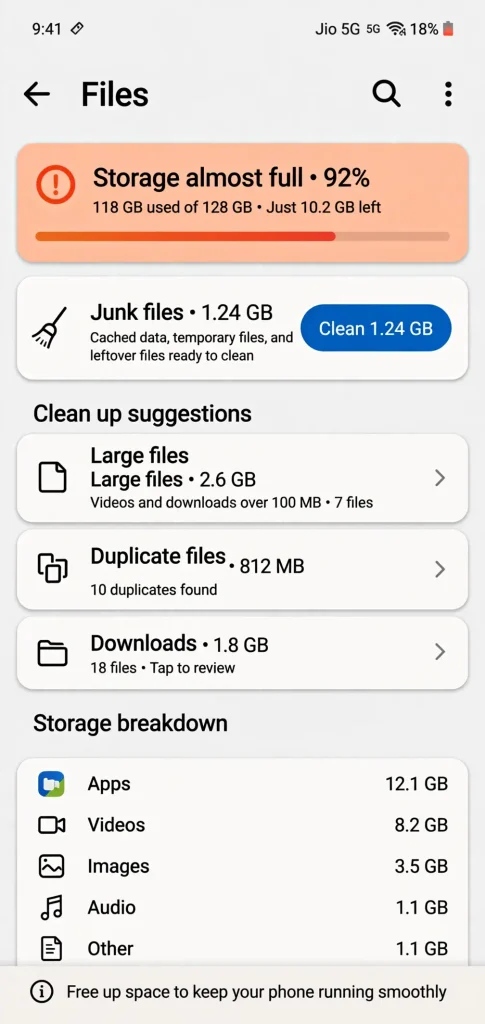
_Image 3: If Storage is 92% full, then phone will hang. Clean Junk, Duplicate and WhatsApp Media from Files App._
5. Use Lite Apps – Best For Old Phones
If your phone is 3GB or 4GB RAM, then heavy apps like Facebook, Instagram will take its life.
That’s why the smart answer to how to make old phone fast is Lite Apps.
- Instead of Facebook, use Facebook Lite
- Instead of Messenger, use Messenger Lite
- Instead of Google, use Google Go
These apps are only 10-15MB, and do exactly the same work, but keep the phone light.
6. Restart Your Phone – Most Ignored Hack
I know this looks very simple, but this is the most powerful part of mobile hang problem solution.
Restart your phone 2 times a week. Restarting closes all stuck processes in the background, RAM becomes fresh, and the phone gets a new start.
I have made this habit in my phone – Restart once every Sunday morning. That’s it.
7. Check Software Update – But Do It Wisely
Sometimes the company sends an update to fix the phone’s slowness. Go to Settings > Software Update and check, if an update has come, do it on WiFi.
But if your phone is more than 4-5 years old, and the update is very big, then don’t do it. A big update can make an old phone even slower. Do small security updates, stay away from big version updates.
Mobile Hang Problem Solution – Never Make These 2 Mistakes
1. Don’t Download Cleaner App:
On Play Store, apps like Clean Master, RAM Booster will appear which will say “Make Phone Fast”. This is the biggest lie. These apps themselves run in the background, make the phone even slower, and show ads. Stay away from them.
2. Don’t Do Factory Reset First:
Many people do Factory Reset first. Before that, try the above 7 hacks. 90% of people’s work is done with these only.
Final Verdict – My Opinion
See, how to make your phone fast – it does not mean buying a new phone. My phone is also 2 years old, but with these 7 hacks it still runs smoothly today.
You do the first 3 things today itself – Cache Clear, Restart, and Animation 0.5x. By tonight you yourself will feel the phone has become lighter.
And yes, if your phone has become more than 5-6 years old and the battery has also swollen, then don’t force it. Then buying a new one is wise. I have given its list here – [Best 5G Phone Under 15000]
Frequently asked questions
Q1. Phone is hanging, what should I do first?
First Restart your phone, then Clear Cache of Chrome. You will see a difference in 2 minutes.
Q2. Will clearing cache delete photos?
No, absolutely not. Clearing cache only removes temporary files. Your photos, login, everything remains safe.
Q3. Will turning ON Developer Options damage the phone?
No, if you only change Animation Scale to 0.5x, there is no harm. Don’t touch other settings.
Q4. How to make old phone fast without buying a new one?
The above 7 hacks, especially Storage Empty + Lite Apps + Animation 0.5x, these three work like magic for old phones.
Q5. How to make phone fast without app?
You have to do it without app only. All hacks happen from Settings only. No need to download any app.


